> ## Documentation Index
> Fetch the complete documentation index at: https://fillout.com/help/llms.txt
> Use this file to discover all available pages before exploring further.
# Create records in multiple tables
> Sync form submissions to multiple tables or databases, such as Airtable, Notion, Monday.com, SmartSuite, Salesforce, Zite Database, Attio, and ClickUp.
export const SupportBanner = () => {
const titleId = React.useId();
return ;
};
## Overview
A form can only be **connected to one database and table** at a time. For example, if your form is connected to Airtable, you cannot connect it to another table or database without disconnecting the current connection first.
Google Sheets is an exception. You can connect it alongside a database, such as Airtable, because each connection creates a new sheet automatically.
However, you can still use form submissions to create records in multiple tables or databases using the workarounds below.
## Ways to create records across tables
### Combine multiple forms
Create a separate form for each table and connect each form to its corresponding table. Then, [link the second form to the **Ending Page** of the first form](https://www.fillout.com/help/combine-and-repeat-forms#auto-redirect-to-another-form) to redirect users to it after submission.
### **Use subforms**
Add a **Subform** field to your main form and connect that to a separate form with its own database or table. Check this [quick guide](https://www.fillout.com/help/subforms#how-to-use-a-subform-within-your-form).
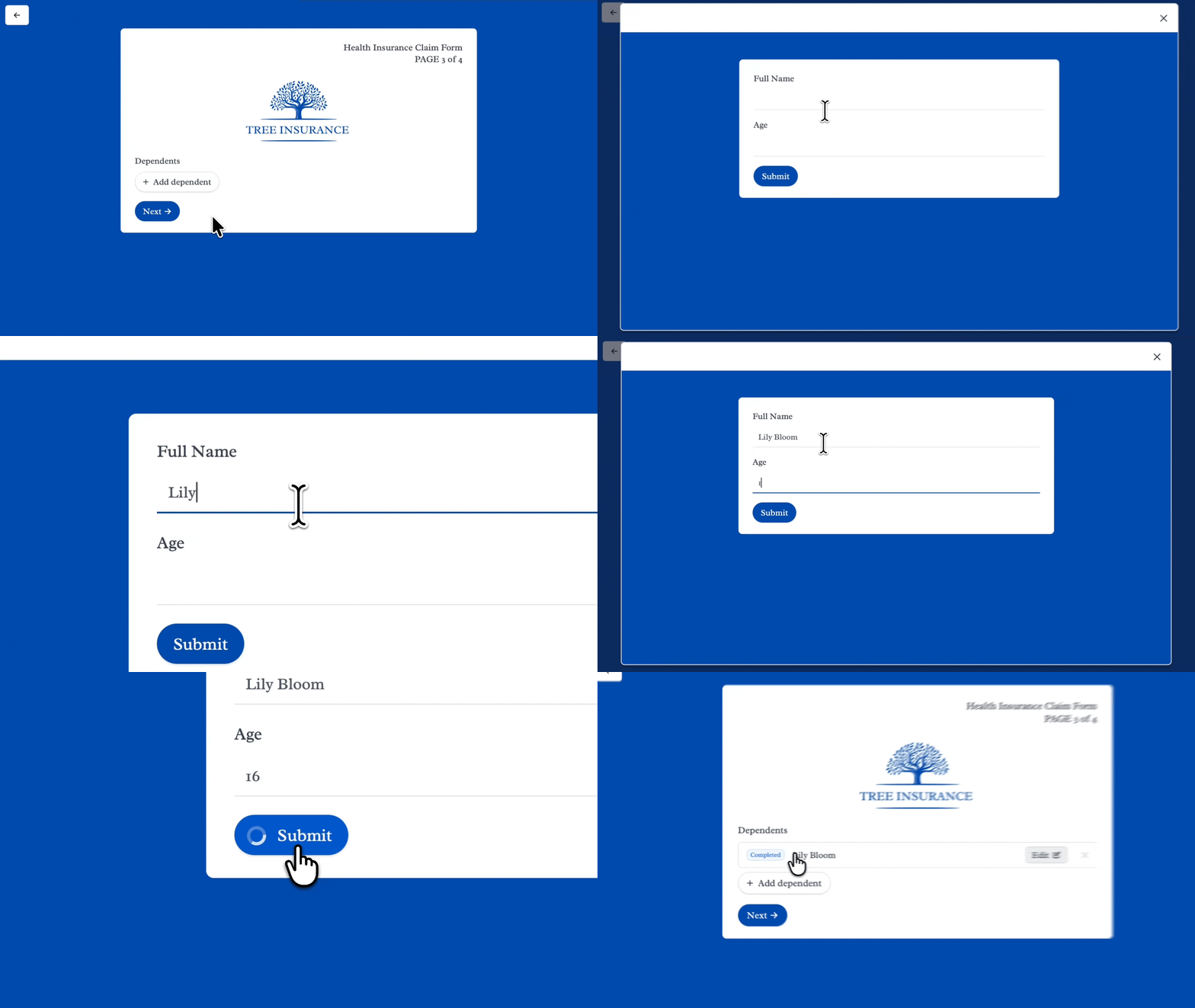 When respondents submit the form, the subform creates a record in its connected table, while the main form creates a record in its own table.
### Use Record Pickers with linked tables
In this example, we'll connect our form to Airtable. Add a [**Record Picker**](https://www.fillout.com/help/record-pickers), then enable [**create new records**](https://www.fillout.com/help/create-new-linked-records#create-new-linked-records) in the settings.
When respondents submit the form, the subform creates a record in its connected table, while the main form creates a record in its own table.
### Use Record Pickers with linked tables
In this example, we'll connect our form to Airtable. Add a [**Record Picker**](https://www.fillout.com/help/record-pickers), then enable [**create new records**](https://www.fillout.com/help/create-new-linked-records#create-new-linked-records) in the settings.
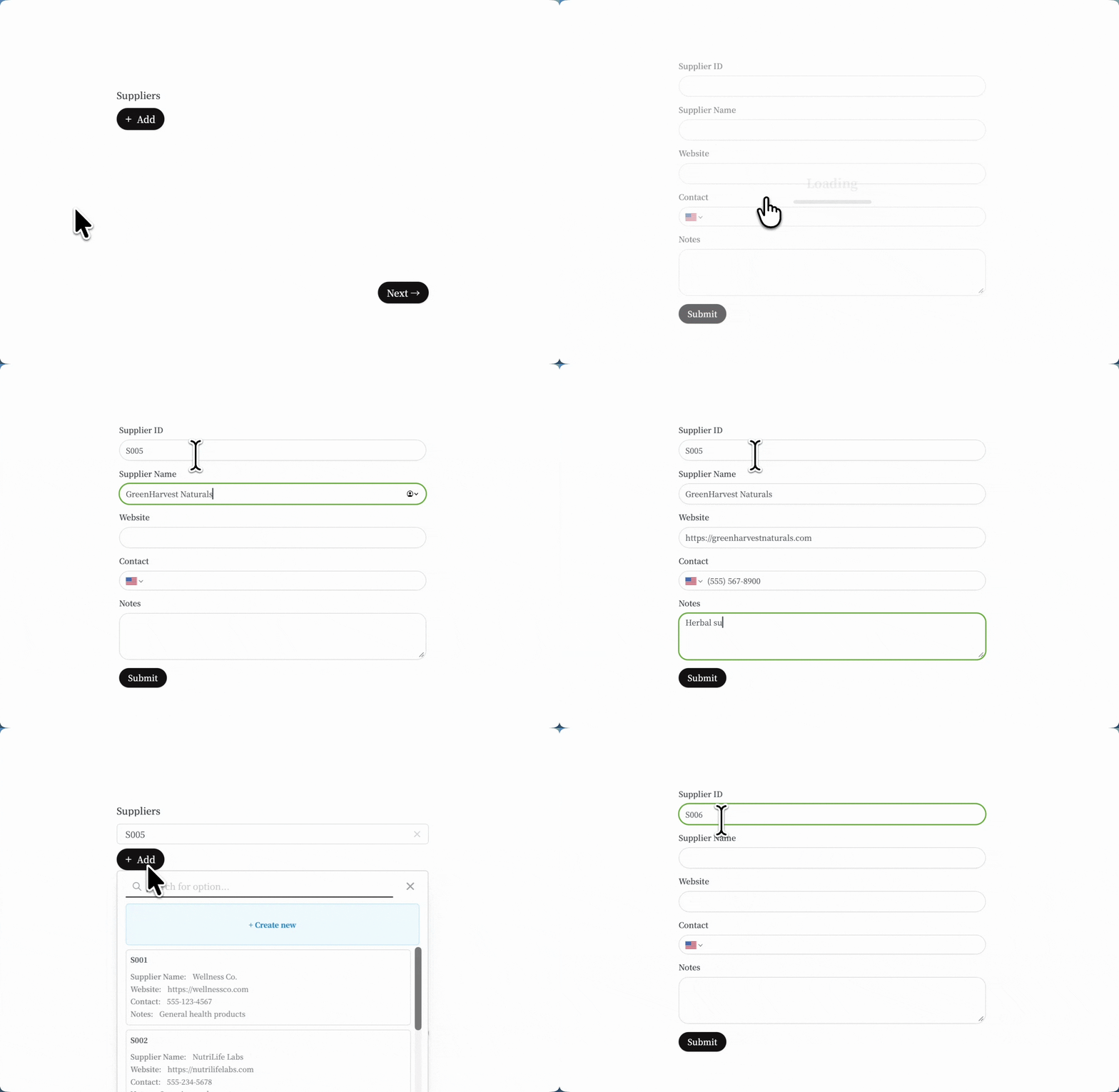 Respondents can then create new linked records directly from the main form. When they submit the form, both the main record and linked records are created and connected.
This feature also supports SmartSuite, Zite Database, Salesforce, Notion, and Monday.
### Use webhooks and external automation
Add a **Webhook** to your form and connect it to an automation tool like Zapier or Make. Then, set up the automation to create records in multiple tables or databases. Learn more [here](https://www.fillout.com/help/webhook).
This approach is flexible, but the records are created through the external automation tool rather than Fillout’s native integrations.
## Related articles
Collect repeated data with nested forms.
Set pre-fills, reference fields, and more.
Send to automation tools or any endpoint.
Respondents can then create new linked records directly from the main form. When they submit the form, both the main record and linked records are created and connected.
This feature also supports SmartSuite, Zite Database, Salesforce, Notion, and Monday.
### Use webhooks and external automation
Add a **Webhook** to your form and connect it to an automation tool like Zapier or Make. Then, set up the automation to create records in multiple tables or databases. Learn more [here](https://www.fillout.com/help/webhook).
This approach is flexible, but the records are created through the external automation tool rather than Fillout’s native integrations.
## Related articles
Collect repeated data with nested forms.
Set pre-fills, reference fields, and more.
Send to automation tools or any endpoint.