> ## Documentation Index
> Fetch the complete documentation index at: https://fillout.com/help/llms.txt
> Use this file to discover all available pages before exploring further.
# Validate form emails
> Collect accurate data with real-time email validation. Disallow free email accounts (e.g. Gmail) or only allow valid email addresses, based on an external database check.
export const SupportBanner = () => {
const titleId = React.useId();
return ;
};
## How to validate business emails
First, add an `Email` field to your form and click its to open the right-hand panel settings.
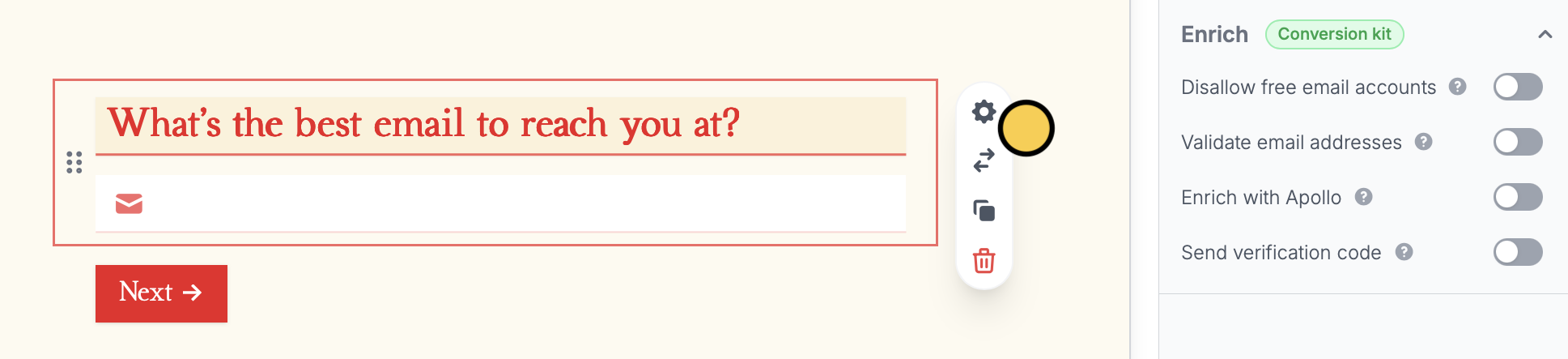 Head to the **Enrich** section where you can:
* **Disallow free email accounts** - to block free email accounts (e.g., @yahoo.com, @gmail.com, and @hotmail.com) and require business or org emails only
* **Validate email addresses** - to only allow valid emails to be submitted. Fillout calls a third party service to check if the email is valid. This helps prevent typos, like if someone types [jeff@amazon.co](mailto:jeff@amazon.co) instead of [jeff@amazon.com](mailto:jeff@amazon.com)
* **Enrich with Apollo** - route leads to different pages based on company details. More info [here](https://www.fillout.com/help/lead-enrichment).
* **Send verification code** - to send OTPs to emails or phone numbers. Check out the guide [here](/help/email-sms-otp).
Validation rules are enforced when a respondent tries to proceed to the next page.
Head to the **Enrich** section where you can:
* **Disallow free email accounts** - to block free email accounts (e.g., @yahoo.com, @gmail.com, and @hotmail.com) and require business or org emails only
* **Validate email addresses** - to only allow valid emails to be submitted. Fillout calls a third party service to check if the email is valid. This helps prevent typos, like if someone types [jeff@amazon.co](mailto:jeff@amazon.co) instead of [jeff@amazon.com](mailto:jeff@amazon.com)
* **Enrich with Apollo** - route leads to different pages based on company details. More info [here](https://www.fillout.com/help/lead-enrichment).
* **Send verification code** - to send OTPs to emails or phone numbers. Check out the guide [here](/help/email-sms-otp).
Validation rules are enforced when a respondent tries to proceed to the next page.
 Email validation is part of the conversion kit paid add-on. Learn more and get started [here](https://www.fillout.com/conversion-kit).
## Related article
Ensure valid responses with email or SMS verification.
Email validation is part of the conversion kit paid add-on. Learn more and get started [here](https://www.fillout.com/conversion-kit).
## Related article
Ensure valid responses with email or SMS verification.